Azure Dev Summit
Azure Dev Summit
The first ever Azure Dev Summit. 13-15 October 2025, Lisbon, Portugal.
TL;DR: Summary
Day 1
Keynote: Reimagining the software development lifecycle with agentic AI
The keynote introduced the concept of agentic AI for development, which represents a significant evolution from traditional development tools. This new paradigm includes intent recognition, context awareness, proactive guidance, multi-step planning, and conversational debugging capabilities.
The shift moves from executing simple commands to understanding developer goals, from static suggestions to dynamic context-aware guidance, from manual debugging to conversational reasoning, and from one-shot actions to multi-step planning. Essentially, this transforms the IDE from a passive tool into an active development partner.
GitHub’s Spec Kit allows developers to describe their intent and requirements along with their tech stack. The system can work asynchronously to assign tasks, create tests, and conduct code reviews.
An SRE agent acts as a first line of defense, capable of detecting issues and taking actions like scaling up resources. The agent has comprehensive knowledge of all resources and code, enabling it to identify what code changes may have caused specific issues. This is being developed as a native Azure service, currently in public preview with general availability expected within a couple of weeks.
Side note: The demo was deployed to Azure Container Apps, which appears to be the recommended approach for these types of deployments.
.NET Advanced Aspire
The session covered how to integrate Function Apps within Aspire containers.
You can start with dotnet new aspire-starter to create a production-ready setup.
Functions can scale quickly to 1000 instances, using containers and Kubernetes infrastructure that remains abstracted from the developer.
Aspire is not tied exclusively to Azure and provides capabilities similar to what we achieve with Bicep.
The azd CLI serves as a Kubernetes-like command tool, similar to docker-compose functionality.
The Aspire.Hosting.* packages provide integrations for services like Redis.
Security is built-in with managed identities used exclusively instead of connection strings.
The system supports both GitHub Actions and Azure DevOps pipelines, though the presenter suggested GitHub Actions as the preferred choice.
The pipeline executes azd commands and sets variables
in the GitHub repository without requiring secrets.
When using the Azure Managed Redis package,
you can call .AsContainer() to use a container for local development.
The azd generate command creates Bicep files, and there’s a tool called “plow” that functions like curl but with load testing capabilities.
The Evolution of Security Attacks and Threats
This session covered the historical evolution of security attacks, noting that many current threats aren’t fundamentally new. A significant development mentioned was the OWASP Agentic AI Top 10, which addresses security concerns specific to AI-driven systems.
Introducing Aspire - a dev-first toolkit for your entire stack
Aspire offers integration capabilities across Microsoft, Azure, and community ecosystems.
The platform follows a “dev first, ops friendly” philosophy, making it easy to create custom integrations.
Maybe we could create integrations for our Nfield services, for example AddPublicApi, AddManagerApi, etc.
There’s an Aspire CLI to create, manage, run, and publish polyglot Aspire projects.
Notably, Microsoft has renamed the product from “.NET Aspire” to simply “Aspire” to reflect that it’s not limited to Azure environments. A dedicated website at aspire.dev is coming soon.
Getting Authorization Right in .NET: Patterns, Pitfalls, and Practical Guidance
This session focused specifically on authorization - the component that comes after authentication. Several authorization patterns were discussed:
- RBAC - Role-based access control
- PBAC - Permission-based access control
- ABAC - Attribute-based access control
- ResBAC - Resource-based access control
- CBAC - Context-based access control
For permission-based systems, tokens become unwieldy with too many permissions. The recommendation is to always use OIDC instead of username/password authentication. Oauth supports username/password for convenience, but it’s not part of the core protocol.
When configuring claims, set MapInbound = false to avoid using the old, lengthy claim names (URLs), but then you’ll need to specify the names explicitly (e.g., RoleName = "role").
The practice of storing tokens in browsers is deprecated; instead, use the Backend-for-Frontend (BFF) pattern.
For minimal APIs, keep authorization logic together rather than scattered across multiple controller classes.
You can use MapGet for individual endpoints or MapGroup to apply the same authorization rules to multiple endpoints.
Authorization logging can be implemented by creating an IAuthorization implementation with dependency injection and injecting a logger.
In authorization handlers, call Succeed() and/or Fail() to determine whether processing should continue.
ABAC systems can incorporate roles, permissions, time, IP addresses, and other attributes.
Minimal APIs leverage dependency injection, making validation straightforward when comparing against requirements.
CBAC considers factors like tenant, time of day, and other contextual information.
The key takeaway is to design authorization requirements upfront rather than retrofitting them later.
Check the speaker’s LinkedIn profile for demo code from the session.
Supercharged Testing: AI-Powered Workflows with Playwright + MCP
MCP (Model Context Protocol) connects AI models with data sources and tools. The system uses instructions to define how MCP should behave, with prompts at the top level followed by detailed, repeatable instructions.
Test plans can be described in natural language from a user’s perspective, which explains why selectors focus more on text content rather than CSS selectors. When a test step fails, there’s a “copy prompt” button that generates instructions for the agent to investigate the failure.
The new approach recommends using the Playwright Agent instead, which creates three components: planner, generator, and healer.
Chat mode offers choices between chat and agent modes in the context menu.
The init command generates necessary files.
The Playwright Test MCP is the newest version. Playwright fixtures enable code reuse and are considered superior to page objects. The seed functionality works within the planner. It can prompt for credentials, which will be hidden from the user. The healer component fixes failing tests.
All three agent modes (planner, generator, healer) operate independently, allowing you to use any combination. However, it’s important not to continuously fix tests, as failures might indicate actual bugs.
The workspace feature enables parallel test execution
Tests can be regenerated when the application changes while keeping the same specification.
Important limitation: The Playwright test agent currently only supports JavaScript, not .NET.
This approach suggests we might be doing testing wrong and should consider:
- Using fixtures instead of page objects
- Writing plans instead of direct code
- Using page base classes instead of manually creating browsers
- Leveraging workspace for parallelization
- Potentially creating plans from existing tests and rewriting them in JavaScript using MCP
Building Agentic MCP Flows with AI Gateway and MCP Registry
This session focused on integration with Azure API Management (APIM). APIM can handle token management, where the chat interface posts a link for SSO authentication, and then uses the resulting token for subsequent operations.
Day 2
Keynote: The Next 25 Years of Software Engineering
The keynote humorously referenced the idea of being able to “vibe code into production”, which drew laughter from the audience, followed by the advice “don’t vibe”.
A new Copilot Modernization agent was demonstrated, designed to upgrade applications (for example, from .NET 8 to .NET 10). The process begins with creating a plan in a markdown file, emphasizing that “in AI, markdown is code”.
The Copilot CLI can be asked “what am I doing?” when you have work in progress.
The recommendation is to always ask for a plan first and treat the LLM as an enthusiastic intern.
Progress tracking is managed through a progress.md file that serves as a checklist.
The philosophy around automation focuses on jobs that are “dull, dirty, or dangerous” - essentially the tasks you don’t want to do yourself.
The Azure Best Practices tool was mentioned as a resource.
The session suggested asking AI to explain your application and create diagrams in formats like ASCII art or Mermaid.
What’s next in C#
The biggest feature coming in C# 14 is extension members.
This requires moving away from the traditional method paradigm because members don’t use parameters.
The new extension keyword creates a block where you can define multiple extensions.
The block itself has parameters that are shared across all members within it.
You can define both getters and setters, though setters aren’t recommended as extensions shouldn’t change state.
Methods can also be placed inside extension blocks, along with properties, methods, and operators.
There’s an Elvis operator for += operations.
The field keyword provides access to the auto property’s backing field, eliminating the need for explicit backing properties.
You can also implement user-defined compound operators - normally only the + operator is available for compound operations.
Looking ahead to C# 15, union types are planned (similar to TypeScript).
For example, a Pet type could be either a Dog or Cat, where these can be completely different types (record and class).
The type system ensures you can only be one of the specified types.
Pattern matching with switch expressions becomes exhaustive, eliminating the need for default catch-all cases.
Event-Driven Architectures at Scale: Real-World Patterns with Azure Functions Flex Consumption
Flex Consumption is the new hosting plan for Azure Functions. The primary motivation for this new hosting plan is improved integration with Virtual Networks (VNETs). You can choose vertical scaling options including 0.5GB, 2GB, or 4GB memory with corresponding CPU allocations. Concurrency can be configured to control how many executions run per instance - for example, Python might use a setting of 1 due to its concurrency limitations. Some triggers default to 1 execution per instance, such as timer triggers. Queue-triggered functions scale based on queue depth. Event Hub triggers scale according to the number of partitions. Batching is more efficient for both events and queues, though it makes exception handling more complex. Flex Consumption provides deterministic scaling behavior. There’s an “always ready” option where you can specify a number of instances (e.g., 1 or 2) that remain warm. The idle pricing is lower than execution pricing.
The traditional blob trigger was too slow, but the new implementation uses Event Grid and performs much better, eliminating exponential backoff issues.
While other hosting plans may still make sense in certain scenarios, Flex Consumption should be considered the default choice for new Azure Functions deployments.
DevContainers for Azure cloud platform engineers
DevContainers provide development environments tailored for cloud platform work, including:
- Tools: Bicep, various CLIs, and other cloud-specific tooling
- Frameworks: .NET and other development frameworks
- Lifecycle management: Azure Container Registry (ACR) integration
DevContainers can create temporary environments specifically for code reviews.
If you need to add components to the base image, you can use a Dockerfile. Microsoft’s base images include many common Linux tools, with options to specify which ones you need.
The Azure MCP can be accessed using @azure.
Settings can use ${input:...} syntax to prompt users for sensitive information that won’t be visible in the container configuration.
Rather than executing all build steps in your CI/CD pipeline, you can build the container image as part of the pipeline process. DevContainers support multiple containers through docker-compose, allowing you to include services like Cosmos DB, Redis, and Azure emulators.
You can use GitHub Codespaces instead of local development, connecting through VS Code or working directly in the browser. The free tier provides 120 core hours (equivalent to 60 hours with 2 cores).
Templates are available at containers.dev/templates, and these templates can be published to container registries for reuse.
Hard lessons learned from a decade of architecting software products on Azure
This was the first talk I attended where the room was completely full. The session focused on startup stories and architectural lessons learned over a decade of building on Azure.
The session I probably should have attended instead was: Intelligent AI app development with .Net Aspire on Azure App Service
From JSON to RCE: Modern .NET Serialization Attacks
The session covered several types of serialization vulnerabilities:
- Type confusion: When you expect an integer but receive a string
- Gadget chain: Exploiting object relationships for malicious purposes
- Resource exhaustion: Denial of Service attacks
BinaryFormatter had a 22-year lifespan from creation to deprecation, although legacy applications continue to use it.
Newtonsoft Json.NET presents security risks when TypeNameHandling = All is explicitly set by developers.
The MaxDepth setting had no default value until version 13.0.3, which set it to 32.
Previous versions were vulnerable to DoS attacks through deep object nesting.
For example, [[[["depth 5"]]]] represents a nested object with depth 5.
This attack vector can crash applications by sending deeply nested JSON structures.
This raises questions for our own applications:
- Could this be exploited in Nfield?
- Do we allow the framework to deserialize directly?
- We may not need to actively search for this vulnerability since we have penetration testing and Dependabot
- However, this provides another compelling reason to migrate away from .NET Framework
Back to Basics: Efficient Async and Await
The session distinguished between CPU-bound and I/O-bound operations. Async operations offload work to threads and notify when results are available, while parallel operations distribute intensive work across multiple threads. .NET provides the same API for both scenarios.
The cardinal rule is to never block an async operation.
Task.Run may reuse existing threads, which can lead to data leakage between operations.
Instead of using static variables, use AsyncLocal for thread-safe data storage.
Parallel.For is a blocking operation.
async/await rewrites code into continuations. Future .NET versions will have native runtime support for these patterns.
The await keyword ensures continuations run on the same thread, which is particularly important for UI thread operations.
Performance optimization: Avoid unnecessary state machines by not using async/await when dealing with a single task - simply return the task directly. This is more efficient but you lose the stack trace. However, don’t apply this optimization with Entity Framework Core.
async IAsyncEnumerable enables streaming results using yield with async operations.
You can process each element as it’s returned using await for without waiting for all results.
Day 3
There’s No Such Thing as Plain Text
The speaker created a programming language called Rockstar so that anyone can be a rockstar programmer.
This same presentation was given at NDC Oslo 2021.
ASCII was originally designed for teleprinters.
The KOI8 encoding has an interesting feature: if you lose the 8th bit, the text still makes some sense because it maps to the Latin equivalent of Cyrillic characters.
Google has sophisticated detection capabilities - if you type “Ефндщк Ыцшае”, Google knows that you probably meant to type “Taylor Swift” but forgot to switch keyboard layouts from Russian to QWERTY.
In Danish sorting, “Aarhus” appears last in alphabetical order, while “Aachen” appears first because it’s not a Danish name and follows different sorting rules, even though they both start with “Aa”.
Unicode provides several normalization forms for text comparison. The character “ö” can be written as either a single character or as “o” + combining diaeresis (◌̈). While these represent the same letter, they may not be equal depending on the comparison method used.
UTF-8 compression works efficiently because most characters have 00 as their first byte, which UTF-8 compresses effectively.
A novel way to enable Ukrainian car license plates to use Cyrillic letters while remaining comprehensible in countries that use Latin characters is by only using the visually similar characters. These letters can be arrange to spell “pike matchbox”.
Building minimal APIs from scratch
I expected this session to demonstrate how to create applications using minimal APIs, but it was actually a live coding session. The speaker converted a simple, naive web application into code that resembles a simplified version of the actual minimal API implementation, helping the audience understand the underlying design principles.
She used hurl to make HTTP requests, which allows multiple requests in the same file and lets you select specific requests by index.
The concept of an endpoint combines a route with a handler. The demonstration began with a manual implementation using a dictionary of routes, then evolved toward the minimal API design pattern.
Middleware provides more options for separating concerns, such as checking authentication before calling the handler in separate middleware components.
The implementation used DynamicInvoke extensively, which is less performant than Invoke but necessary when working with delegates of unknown types.
Parameter binding was implemented as a comprehensive if statement handling various scenarios.
The complete code is available on GitHub.
AspiriFridays LIVE!
This was a live recording of the AspiriFridays show. You can find their content at youtube.com/@aspiredotdev.
Aspire encompasses both the development experience and deployment experience.
The AppHost.cs file runs all components of your application.
To integrate Aspire into existing applications, you ideally shouldn’t need to modify your app - it shouldn’t need to know it’s running in Aspire.
You can use aspire new to create an AppHost, and then add project references.
For Node.js projects, you can use aspire add node to add Node projects to your Aspire setup.
Secure coding - back to basics
The session opened with the famous quote: “complexity is the worst enemy of security”. A significant statistic was shared: 50% of security flaws are business logic bugs rather than technical vulnerabilities.
Security involves multi-faceted entities, and conversion processes often introduce vulnerabilities.
The Pile of Poo Test™ recommends testing applications with complex Unicode text: Iñtërnâtiônàlizætiøn☃💩.
The principle is to reject invalid data rather than attempting to clean it. Validation should include checking length after text normalization. Avoid using strings for everything - different data types shouldn’t be interchangeable:
- Email addresses aren’t phone numbers
- Use domain primitives
- Validate in constructors
- Make objects immutable
Some validation must occur outside domain objects, such as checking if a password appears in breach databases.
This requires separate classes like Password and ValidatedPassword.
TypeScript provides types but doesn’t perform runtime validation. For example, swapping username and password parameters still compiles successfully. Zod is a TypeScript JSON parser that works particularly well with branded types for stronger type safety.
Content Security Policy (CSP) can enforce require-trusted-types-for 'script', preventing direct string assignment to innerHTML.
Instead, use DOMPurify.sanitize for safe content handling.
Implementing Azure Policies: Before the Portal
Exclusions are legacy functionality and should not be used in new implementations.
When writing policies, include helpful non-compliance messages to guide users toward resolution.
Exemptions are different from exclusions and can be categorized as either mitigation or waiver exemptions.
Azure policies are already integrated into the portal experience - for example, if a policy restricts VM SKUs, disallowed options won’t appear in dropdown menus.
The key question when creating policies is: what business goal does this serve? Policies should address cost management, compliance requirements, or other specific business objectives. Don’t create policies for purely technical reasons without clear business justification. Start with the business goal and work backward to the specific policy implementation. Azure Defender provides top-level goals that can be drilled down into specific policies for implementation.
Closing Keynote: Machines, Learning, and Machine Learning
The keynote emphasized that someone must take responsibility for the code that AI generates. Developers need to become proficient at identifying AI-generated content that may be incorrect or suboptimal.
Writing specifications is crucial - or AI can assist in creating them. This is an area where we often fall short in our development practices. Specifications then serve as instructions for AI systems.
AI excels at solving problems we’ve already solved before, but struggles with genuinely novel challenges.
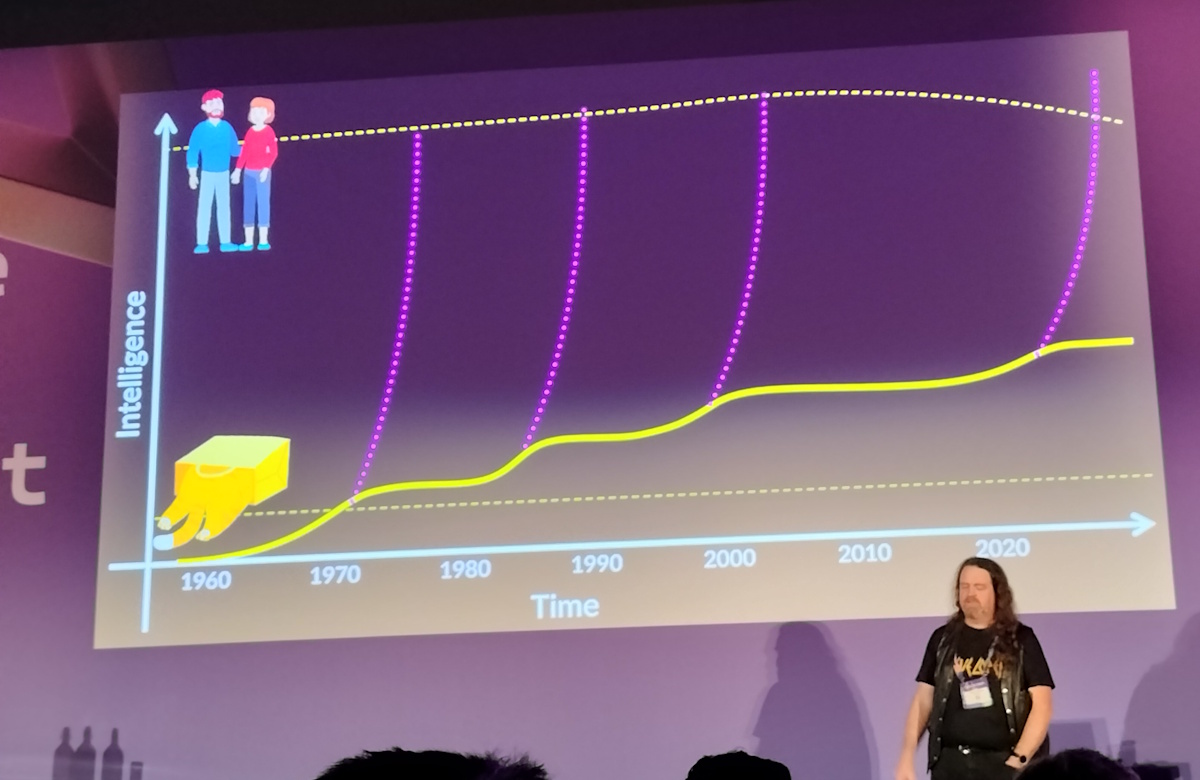
The presentation highlighted a recurring pattern in AI development: every decade or so, we see growth in AI intelligence and expect it to surpass human intelligence within a few years, but progress inevitably plateaus.
Day 4
Day 4 was an Aspire workshop, which you can read about here.
Note: The original rough notes for this post were rewritten into coherent sentences with assistance from GitHub Copilot. The original notes are preserved as HTML comments in the source file.
Note: Videos of the sessions are available on the Azure Dev Summit YouTube channel.